I am going further and further down the AI deep end. Folks really need to try all the latest and greatest stuff, it is incredibly powerful right now. Far more than it was before. As an aside, I think the "Something Big Is Happening" post is one of the clearest discussions of what's going on right now. In the past couple days I've done technical projects at home that would've taken me weeks to do, some of which I pushed off for years. E.g. in 20minutes today I finally setup my richie@mylastnamehere.name email address, which I'd been planning to do for over 5 years and just never fininshed (though I owned the mylastnamehere.name domain).
Tying this back to aquarium stuff, I've also made major improvements to the dashboards I have for my aquarium within HomeAssistant. HA is pretty powerful, but the management setup is a bit hard to use. It's just difficult enough to do that I don't bother tweaking things, and lived with ugly dashboards.
However, now that I have some AI things running locally at home (openclaw) I went through and configured it to have access to my HomeAssistant. After doing so, I gave it directions on what I wanted to do. An example ask:
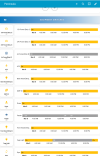
I'd been meaning to do that for a long time, and just never got around to doing so. Now, in a couple minutes of typing and giving it more suggestions, followed by reading reddit while it did it's thing I have this:

Super cool stuff. I think this is another reason not to go Hydros right now, because they have no API. Without an API it's a lot harder to do anything with AI, and in about a year no one will want any tools that aren't AI controllable. I bet it'd be doable to do something like this with Apex. Control what you want your dashboards and controls to be, just using guidance. You can even do this by voice if you want, particularly with tools like Wispr Flow.
Tying this back to aquarium stuff, I've also made major improvements to the dashboards I have for my aquarium within HomeAssistant. HA is pretty powerful, but the management setup is a bit hard to use. It's just difficult enough to do that I don't bother tweaking things, and lived with ugly dashboards.
However, now that I have some AI things running locally at home (openclaw) I went through and configured it to have access to my HomeAssistant. After doing so, I gave it directions on what I wanted to do. An example ask:
I want to create a new dashboard, based around the Water Mixing area. It should have the various devices and the automations.
Within this, I want a new capability. I want to be able to pick how long to run the RO fill. When doing so, I want it to follow a similar flushing mechanism the current RO fills are doing, where it periodically enables the flush for about 5 minutes. Because of that, ignore the previous RO related automations, don't show the ones that are run it for X hours.
For the saltwater mixing, do the same thing as the RO.
Also, let's organize the UI around sections. E.g. I run the RO pieces and then I'd do the saltwater mixing, so let's have 2 separate sections, with some sort of divider between them. Make sure the divider spans the whole view.
I want the dashboard to show the current status of these various core things as important call outs.
I want this to look pretty. Automations should be buttons with relevant icons. Outlets switches in a list.
I want charts of:
* historical TDS value, and where it's unavailable show the last read value. Make sure the summary value for the chart also follows that guidance. Let's color code any TDS < 4 as green, anything above that as red.
* when things like the various pumps and valves were on and off
* a similar view of when the automations were running
* ideally I'd have a layout that showed buttons and historically when they were on and off next to it ala [button] [chart], make sure the spacing will be good even on different size monitors.
I may rerun this with different guidance, so do an in-place edit if the dashboard already exists. Ignore whatever may currently be in that dashboard.
I'd been meaning to do that for a long time, and just never got around to doing so. Now, in a couple minutes of typing and giving it more suggestions, followed by reading reddit while it did it's thing I have this:
Super cool stuff. I think this is another reason not to go Hydros right now, because they have no API. Without an API it's a lot harder to do anything with AI, and in about a year no one will want any tools that aren't AI controllable. I bet it'd be doable to do something like this with Apex. Control what you want your dashboards and controls to be, just using guidance. You can even do this by voice if you want, particularly with tools like Wispr Flow.